Medical Canva Instagram Template: A Practical Toolkit for Consistent Health Content
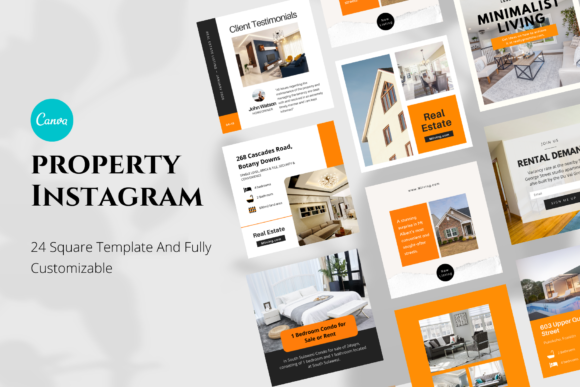
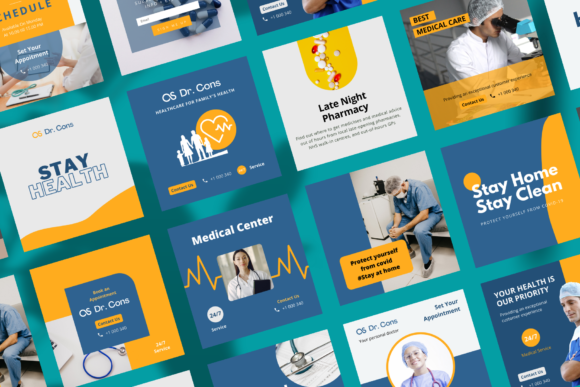
Creating cohesive visual content for a health-related brand, coaching practice, or medical education account often feels like an uphill battle. Between managing client work, staying current with industry research, and maintaining a presence on social media, the design side of content creation can become a bottleneck. The Medical Canva Instagram Template pack addresses this directly. It is a collection of 24 square-format templates built entirely inside Canva, designed for anyone who needs to produce professional, on-brand Instagram posts without starting from scratch each time. Whether you are a healthcare professional building your personal brand, a wellness coach sharing daily tips, or a small business owner promoting health services, this template pack provides a structured starting point that fits naturally into a repeatable content workflow.
What the Medical Canva Instagram Template Pack Offers
At its core, this template pack gives you 24 fully customizable Canva templates sized at 1080 x 1080 pixels, which is the standard Instagram square post dimension. Every element inside these templates is editable: you can change photos, fonts, shapes, background colors, and all text. The files are delivered as a link to a PDF, and from there you access the Canva templates directly. Importantly, you do not need a Canva Pro account to use them. All fonts used are free, and there is no need to upload custom fonts. This removes a common barrier for users who want a professional look without paying for a premium subscription. The templates themselves do not include images, meaning you supply your own photography or graphics, which keeps the final output uniquely yours.
This pack is not about handing you a finished design. It is about giving you a reliable framework that you can adapt quickly, repeatedly, and with minimal friction. For anyone who posts health-related content regularly, that framework is what saves time and preserves visual consistency.
Where This Template Pack Fits in a Content Creation Workflow
Understanding where the Medical Canva Instagram Template pack belongs in your broader process is the first step to using it effectively. Content creation typically follows a cycle: planning, asset gathering, design, publishing, and review. This template pack lives squarely in the design phase, but its influence extends both backward and forward in that cycle.
During the planning phase, knowing you have 24 pre-built designs allows you to think in terms of themes rather than individual layouts. You can map out a month of content around categories like educational tips, client testimonials, product highlights, or event announcements, and assign template variations to each category. This shifts your planning from "what will I design today" to "which template fits this message best."
When you move into asset gathering, the template pack gives you clear constraints. Because the layouts are fixed in size and structure, you know exactly what kind of photos you need, what text lengths work, and where your branding elements go. This eliminates guesswork and helps you source or create visuals that fit the templates rather than forcing designs around random images.
After publishing, the consistency that comes from using the same template family makes it easier to evaluate what works. When every post has a similar structure, you can compare engagement metrics more fairly because the variable is the content, not the layout. Over time, you can refine which template styles perform best and adjust your mix accordingly.
Practical Ways to Use the Templates Before, During, and After a Project
Consider a typical scenario: you are a health coach preparing for a six-week nutrition challenge. Before the challenge begins, you can use the template pack to create all the announcement posts, weekly check-ins, and tip graphics in one sitting. Because the templates are consistent, your audience recognizes the visual style immediately, which builds anticipation. During the challenge, you open a template, swap in the day's photo, update the text, and post it in minutes. After the challenge ends, you use the remaining templates to share results, testimonials, and next-step offers. The same template pack carries the entire campaign from start to finish.
For a medical educator posting daily anatomy facts or public health reminders, the workflow is similar. You batch-create a week's worth of posts on a Sunday evening. Each post takes under ten minutes because you are not designing from zero. The templates handle the layout, and you focus solely on the educational message. This approach reduces decision fatigue and keeps your posting schedule consistent, which is especially important when your content serves an informational or safety-critical purpose.
Small business owners offering wellness products can use the templates to maintain a polished brand presence without hiring a designer. When a new product launches, you pull a template that accommodates a product photo and key features. When you share a customer review, you use a testimonial-style layout. Over time, your feed develops a cohesive look that reinforces trust and professionalism.
Integration with Other Tools, Platforms, and Assets
While the Medical Canva Instagram Template pack lives inside Canva, it interacts naturally with other parts of your workflow. You can pair it with a content calendar tool like Notion, Trello, or a simple spreadsheet. Plan your posts in your calendar, then open the corresponding Canva template and execute. If you use a scheduling tool like Later, Buffer, or Hootsuite, you can design all your posts in Canva, download them, and upload them in bulk. The square size ensures compatibility across Instagram feed posts without cropping issues.
Your existing brand assets also play a role. Because the templates accept custom colors, fonts, and logos, you can integrate your brand guidelines directly into each design. If you already have a color palette from your website or business cards, apply those hex codes to the template backgrounds and text. If you have a logo, place it in the designated area. The templates become a container for your brand, not a replacement for it.
For those who collaborate with a virtual assistant or a junior team member, the template pack simplifies delegation. You can share the Canva template link, give access to edit, and let your assistant swap in images and text while you review the final versions. The low learning curve means less training time and fewer errors.
Practical Implementation Tips for Smooth Execution
To get the most out of this template pack, start by doing a quick audit of your content categories. List the types of posts you make most often announcements, tips, quotes, testimonials, events, product shots, etc. Then match each category to one or two templates from the pack. This gives you a go-to template for every recurring post type.
Next, set up a master Canva project folder. Duplicate the templates so you have a set of originals and a set for active use. Within your active set, create a naming convention that includes the date and post topic. This keeps your workspace organized and makes it easy to find past posts for reference.
Spend an hour customizing the templates with your brand colors, fonts, and logo before you create your first actual post. This upfront investment pays off every time you use the templates afterward. You will not need to adjust settings repeatedly.
When swapping photos, pay attention to the composition. The templates are designed with specific image placements, so choose photos that have the subject centered or positioned according to the layout. Avoid overly busy backgrounds that clash with text overlays. Cropping your images to a square or near-square format before importing them into Canva saves time and prevents awkward adjustments.
For text, keep your copy concise. The templates allocate space for headlines and body text, but shorter messages are easier to read on mobile devices. If you typically write longer captions, use the template for the visual hook and reserve the detailed content for the caption area below the post on Instagram.
Managing Efficiency and Consistency Over the Long Term
One of the strongest arguments for using a template pack is consistency over time. When you post sporadically or with varying visual styles, your audience takes longer to recognize your content in their feed. With the Medical Canva Instagram Template pack, every post carries a familiar visual signature. This builds recognition and trust, especially in the health and wellness space where credibility is essential.
Consistency also helps with quality control. Because the templates are pre-structured, the risk of design errors like misaligned text, inconsistent margins, or awkward color combinations is drastically reduced. You can focus your energy on the accuracy and clarity of the health information you share, knowing the visual presentation is solid.
On the efficiency side, batching is your friend. Set aside one block of time each week or month to create all your posts using the templates. During a batch session, you can produce two to four weeks of content in under an hour. This frees up mental bandwidth for client work, content research, or simply stepping away from the screen.
As your brand evolves, the templates can evolve with you. Change the color palette, update the fonts, or swap out background shapes. The editable nature of the pack means you are not locked into a static design. You can refresh your look without rebuilding everything from scratch.
Observations on Usability and Practical Fit
The fact that this template pack works entirely within a free Canva account cannot be overstated. Many template products require a Canva Pro subscription to access premium elements, which adds an ongoing cost. Here, all fonts are free, and no premium features are needed. This makes the pack accessible to solopreneurs, students, and small teams on tight budgets.
The delivery method via PDF link is straightforward. You click the link, access the templates, and they are added to your Canva account. From there, you can edit, duplicate, and organize them as you wish. The absence of included images is actually an advantage. You are not forced to use generic stock photos that dilute your brand. Instead, you choose visuals that are authentic to your practice, whether that is your own photography, user-generated content from clients, or targeted stock images you select yourself.
For users who are new to Canva, the templates serve as a learning tool. By customizing them, you become familiar with Canva's interface and capabilities. Over time, you may feel comfortable creating your own variations or combining elements from different templates. The pack lowers the barrier to entry while leaving room for growth.
Final Thoughts on Integrating This Template Pack Into Your Routine
The Medical Canva Instagram Template pack is not a magic solution that creates content for you. It is a practical tool that removes the friction of repetitive design work, allowing you to focus on the substance of your message. Whether you are posting daily health tips, promoting a workshop, or sharing client success stories, having a set of reliable templates streamlines your workflow and ensures your visual presence stays professional and cohesive.
To integrate it smoothly, start small. Pick one template and use it for a week of posts. See how it feels. Then expand to two or three templates for different post types. Over a month, you will develop a rhythm that fits your schedule and your brand. The goal is not to use all 24 templates at once, but to have them ready when you need them. That readiness is what transforms content creation from a daily chore into a manageable, repeatable process.