Fashione Keynote Template – A Practical Presentation Toolkit for Real Projects
Most presentation templates look great in previews but fall apart the moment you try to adapt them to your own content. The layouts break. The colors clash with your brand. You spend more time fixing formatting than building your actual message. That is exactly the problem the Fashione Keynote Template sets out to solve. Whether you are pitching a client, teaching a class, or sharing a portfolio, this template gives you a solid foundation without boxing you into a single look.
What the Fashione Keynote Template Actually Offers
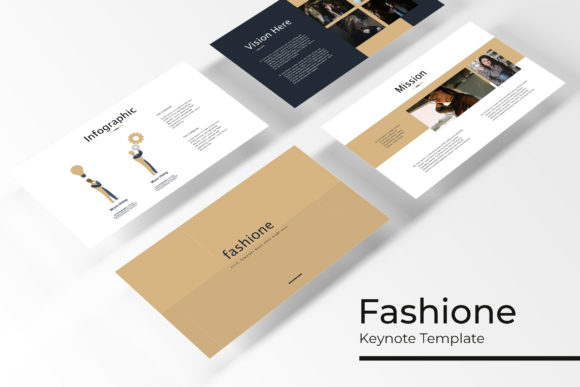
At its core, the Fashione Keynote Template is a set of five complete presentation files, each designed in a distinct color variation. Every file contains 30 slides, which means you get 150 total slides across the full collection. These are not just copy-paste duplicates with different hues. Each color variation stands on its own, giving you a different visual mood depending on the audience and context. The templates come in widescreen format, include handcrafted infographics, section break slides, gallery and portfolio layouts, and pixel-perfect illustrations throughout.
All graphics are resizable and editable. Picture placeholders let you drag and drop images without messing up the alignment. The entire set is built on master slides, so changes you make apply consistently across your presentation. You also get a Readme file with a link to download the free fonts used. One thing to note: the photographs shown in the previews are for illustration only and are not included in the download.
Why 150 Slides Makes a Difference in Real Work
Most presentation projects are not one-and-done. You might create a pitch deck, then repurpose that material into a portfolio, then adapt it again for a speaking event. With the Fashione Keynote Template, you have room to work without starting from scratch each time. The five color variations mean you can match the tone to the occasion. A dark, muted palette might work for a serious business proposal, while a bright, airy variation suits a creative portfolio or a lifestyle blog talk.
Because each color set has 30 slides, you are not left hunting for missing layouts. Need a timeline slide, a team introduction page, a quote slide, or a data chart? They are already there. This is especially valuable when you are under deadline pressure and cannot afford to spend hours building slides from zero.
Portfolio Presentations for Creatives
If you are a photographer, designer, illustrator, or architect, the gallery and portfolio slides in the Fashione Keynote Template are directly useful. The image placeholders are set up so you can drop your best work into the layout, and it stays clean and proportional. You can create a cohesive portfolio that feels polished without needing advanced design skills. The section break slides help you separate different project categories, which is handy when you are showing a range of work in one sitting.
Client Pitches and Business Proposals
Entrepreneurs and freelancers often need to present ideas quickly and professionally. The infographic slides in this template let you visualize data, timelines, or processes without fumbling with charts from scratch. The five color options mean you can align the deck with your brand identity or even match a client's existing branding. The master slide structure ensures that if you change a font or a color across the entire deck, it updates everywhere at once. That saves real time when you are refining a pitch an hour before a meeting.
Marketing and Brand Presentations
Marketers and brand strategists frequently present campaign concepts, audience research, or content strategies. The handcrafted infographics in the Fashione Keynote Template are not generic icon sets. They are designed to communicate ideas visually rather than just decorate the slide. You can use them to show a customer journey, a content calendar, or a campaign funnel. The section break slides help you transition between different parts of a presentation, which keeps the audience engaged and prevents information overload.
Educational and Workshop Content
Educators, trainers, and workshop facilitators need presentations that are clear and easy to follow. The template's layout variety supports different types of content: explanatory slides, checklist slides, comparison slides, and quote slides. If you are teaching a multi-session course, you can use a different color variation for each module. That gives learners a visual cue that they are moving into a new topic. The drag-and-drop image placeholders also make it quick to swap in screenshots, diagrams, or photos relevant to your lesson.
Bloggers and Content Creators
If you create content for YouTube, Instagram, or a blog, you might need presentations for webinars, sponsored posts, or digital products. The Fashione Keynote Template works well for creating lead magnets, free guides, or opt-in resources. The 30 slides per color set give you enough variety to build a complete digital product without hiring a designer. You can export the slides as images or PDFs and use them across your platforms. The pixel-perfect illustrations also look good when viewed on mobile devices, which matters for social media content.
Small Business Owners
Running a small business means wearing many hats, and presentation design is often not your strongest skill. The Fashione Keynote Template removes that pressure. You can put together a deck for a local event, a trade show, or a community presentation without feeling like it looks unprofessional. The resizable graphics mean you can adapt slides for different screen sizes, and the master slide functionality helps you keep a consistent look even if you are not a design expert. The Readme file with font links removes the guessing game around font compatibility.
What to Consider Before Using This Template
The Fashione Keynote Template is designed for Keynote, which is Apple's presentation software. If you work primarily on a Windows machine or use Google Slides, you should check compatibility before purchasing. Some users convert Keynote files to PowerPoint, and that usually works fine, but you might lose some formatting or animation details in the process.
Another point is that the preview images are not included. The template comes with placeholders, not stock photos. You need to supply your own images. That is actually a plus for most users because it avoids licensing issues and lets you use your own brand imagery. But if you were expecting ready-to-use photos, it is something to be aware of.
The free font download link is included, which is helpful. Make sure you download and install the fonts before you start editing, otherwise your text may default to a system font and the layout could look different than intended. The Readme file explains this clearly, so give it a quick read before diving in.
If you need a single color scheme and are not planning to repurpose the deck for multiple projects, the five-file bundle might feel like more than you need. But if you work across different clients, topics, or formats, the variety pays off quickly. You essentially get five complete presentation systems in one purchase.
Connecting Features to Real Outcomes
The handcrafted infographics are not just decorative. They help you explain complex ideas in a way that your audience can grasp quickly. If you have ever tried to build an infographic from scratch in Keynote, you know how tedious it can be. Having those pre-built saves you that friction.
The picture placeholders are designed for drag and drop. That sounds like a small thing, but when you are importing dozens of images, it makes a big difference. You do not have to resize, crop, or reposition each photo manually. The layout does that work for you.
The master slide structure means consistency is baked into the template. If you decide to change the headline font halfway through building your deck, you can update it once on the master slide and every slide adjusts automatically. That is the kind of feature that experienced presenters value because it prevents last-minute formatting headaches.
The pixel-perfect illustrations hold up on retina displays, projectors, and printed handouts. That matters if you are presenting in a high-resolution environment or if you plan to share your slides as PDFs afterward.
Final Thoughts on the Fashione Keynote Template
A good presentation template does not just look nice in the preview gallery. It adapts to your content, saves you time, and gives you confidence that your slides will not break when you need them most. The Fashione Keynote Template delivers on that by offering five distinct color systems, 150 total slides, and practical features like infographics, portfolio layouts, and master slide control. Whether you are a freelancer building a client pitch, a teacher preparing a workshop, or a small business owner putting together a community presentation, this toolkit gives you room to work without overwhelming you with options you will never use. Just remember to supply your own photos, check your software compatibility, and install the fonts before you start. That way, you get straight to the work that matters: communicating your ideas clearly and visually.