Choosing the Right Presentation Toolkit: A Practical Look at the Coffees Google Slide Template
When you are preparing a presentation that needs to look polished without consuming days of design work, the choice of template can make or break your workflow. The Coffees Google Slide Template offers a substantial library of 150 total slides spread across five premade color variations, giving you 30 slides per template. At first glance, that volume suggests flexibility, but the real question is whether this template fits your specific project needs better than other approaches you might be considering.
Many professionals in their 20s to 50s find themselves weighing options between building slides from scratch, using a general-purpose template, or investing in a specialized set like Coffees. Each path has tradeoffs, and understanding where Coffees excels and where it may fall short can help you decide if it deserves a spot in your workflow.
What Makes the Coffees Google Slide Template Distinct
The Coffees template is built around a warm, coffee-inspired aesthetic, but its design system extends beyond just a color palette. You get five premade color variations with 30 slides each, meaning you can switch between themes without rebuilding your content. This is useful if you present to different audiences or need to align with varying brand guidelines.
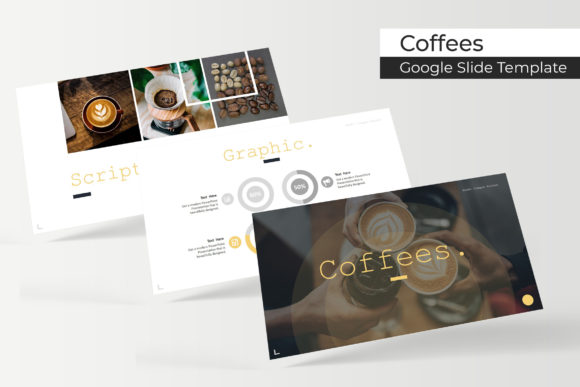
Beyond the color options, the template includes handcrafted infographics in PowerPoint format, section break slides, a gallery and portfolio slide, and resizable, editable graphics with picture placeholders that support drag-and-drop. The entire set is based on master slides and uses pixel-perfect illustrations. The package comes with five PPTX files, five PPTX widescreen files, a readme first document, and a link to the free fonts used.
One detail worth noting from the outset: all photographs or pictures in the preview are for illustration purposes only and are not included. If you need stock imagery, you will need to source that separately, which is typical for premium templates but worth factoring into your planning.
Comparing Coffees to Other Presentation Approaches
If you are used to working with general slide templates, you might find that many offer only a dozen or two slides with maybe one color variation. Coffees gives you five distinct color sets and 150 total slides, which is significantly more than average. That volume can save time if you present frequently or need to maintain visual consistency across multiple decks.
On the other hand, if you prefer complete creative control, you might lean toward building slides manually in Google Slides or PowerPoint. The tradeoff is time: handcrafting infographics, aligning graphics, and ensuring consistent spacing takes hours. Coffees automates much of that with its master slide structure and prebuilt infographics. However, if your presentation requires highly specialized layouts that deviate from the template's structure, you may find yourself fighting the template rather than being helped by it.
Another common alternative is using a simpler template with fewer slides and supplementing with custom graphics. That approach can work if your presentations are short or highly unique each time. But for recurring reports, client proposals, or educational content that follows a predictable structure, the slide diversity in Coffees reduces repetitive work.
Strengths That Stand Out for Regular Presenters
The five color variations are not just minor hue shifts. They represent distinct themes that change the mood of your deck. This is particularly valuable if you present to different departments or external clients who have their own color expectations. You can develop a core set of content and adapt the visual identity in minutes.
The handcrafted infographics are another practical strength. Infographics are time-consuming to build from scratch, and many templates provide only generic charts. Coffees includes infographics that are designed to be resized and edited without breaking their visual integrity. If you present data frequently, this feature alone can justify the template cost.
Section break slides and a gallery/portfolio slide add structural variety. Section breaks help your audience orient themselves during longer presentations, and a dedicated gallery slide is useful for showcasing case studies, product images, or team members. These are not features you commonly get in free or basic templates.
The use of master slides means that changes you make to the master layout cascade through all slides that rely on it. This is a major timesaver when you need to tweak fonts, colors, or spacing across a large deck. Coupled with pixel-perfect illustrations, the output looks cohesive without requiring manual adjustments on every slide.
Tradeoffs and Limitations to Consider
No template is perfect for every situation, and Coffees has its constraints. The first is that the included assets are for Google Slides and PowerPoint. If your team uses Keynote or another platform, you will need to convert files, which can introduce formatting issues. The template comes as PPTX files, so compatibility is strong for Microsoft and Google users, but not universal.
The five color variations are premade, so customization beyond those palettes requires manual work. If your organization uses a specific blue or green that does not appear in the offered colors, you will need to adjust each slide or create a new color theme yourself. That is doable but reduces the "out of the box" time savings.
Another limitation is that the preview images use photographs that are not included. If your presentation relies heavily on high-quality photography, you need to budget for sourcing images that match the template's aesthetic. The template's design assumes you will add your own imagery, which is standard, but it is something to plan for rather than discover after you start building.
Also, while 150 slides is a large library, not every slide will be useful for every presentation. You may find that you consistently use 20–30 slides from the set and the rest serve as occasional references. That is not a flaw, but it means the value is in the variety available rather than in using every slide.
When Coffees Is Likely the Right Choice
Consider Coffees if you prepare presentations on a regular basis and need a consistent, professional look across multiple decks. The five color variations make it easy to adapt to different contexts without starting over each time. If your work involves client proposals, internal reports, or educational content where infographics and section breaks add clarity, the template's structure aligns well with those needs.
The template is also a strong fit if you are not a design specialist but still need to produce visually appealing slides. The pixel-perfect illustrations and master slide system reduce the chance of misaligned elements or inconsistent formatting. You can focus on content while the template handles the visual framework.
For team environments, the ability to share one template across multiple people and maintain brand consistency is valuable. The included readme file and font links make setup straightforward, even for colleagues who are less technically inclined.
When You Might Need a Different Option
If your presentation needs a highly custom visual identity that goes beyond the five provided color themes, you may find Coffees restrictive. Similarly, if you present primarily on mobile devices or in non-standard aspect ratios, the widescreen format may require additional adjustments.
If you work exclusively in Keynote or collaborate with users who do, the PPTX format may introduce friction. In that case, a template native to Keynote might be a smoother choice, or you may need to budget time for conversion testing.
Another scenario where Coffees might not be the best fit is when your content is minimal or highly non-standard. A 150-slide template is overkill for a short pitch deck that only needs 10 slides. You would be paying for features you never use, and a simpler, smaller template might serve you better.
Practical Decision Factors to Evaluate
Before committing to Coffees, think about the following:
- How often do you present? Frequent presenters gain more value from a versatile template library than occasional users.
- How much customization do you need? If you need to match a specific brand palette that differs from the five provided, factor in the time to adjust colors.
- Do you use infographics regularly? The handcrafted infographics are a standout feature, but only if your presentations actually include data visualizations.
- What is your team's platform? If everyone uses Google Slides or PowerPoint, Coffees integrates easily. Mixed environments may require extra steps.
- What is your budget for additional assets? Remember that photographs are not included, so you may need to purchase stock images or use your own.
These questions help you weigh the template's strengths against your actual workflow rather than getting drawn in by the total slide count alone.
Making the Most of the Slide Library
If you decide to use Coffees, start by reviewing all five color variations to see which one best matches your content or audience. Then, go through the 30 slides in that set and identify which layouts you will reuse most often. The gallery and portfolio slide is particularly useful if you showcase projects, team members, or client work. The section break slides help organize longer decks into digestible chapters.
Because the graphics are resizable and editable, you can adapt individual elements without breaking the overall design. Take advantage of the master slides to make global changes early so that all downstream slides stay consistent. The drag-and-drop picture placeholders simplify image insertion, and the pixel-perfect illustrations ensure your final deck looks sharp on screens and projectors.
Keep the font links handy and install the free fonts before you start building. Skipping this step can lead to formatting discrepancies if the fonts are not available on your system. The readme file provides setup instructions, so follow it rather than guessing.
Final Thoughts on Choosing a Presentation Template
The Coffees Google Slide Template offers a comprehensive set of slides, multiple color themes, and thoughtful design elements like handcrafted infographics and section breaks. Its strengths lie in volume, consistency, and ease of use for frequent presenters who want professional results without deep design skills. However, it is not a universal solution. Consider your specific context: how often you present, how much customization you need, what platform your team uses, and whether the included features align with your content types.
By evaluating these factors honestly, you can decide whether Coffees is the right tool for your next presentation or whether a different approach better suits your needs. The best choice is the one that saves you time while helping you communicate clearly, and that depends as much on your own workflow as on the template's features.