Urbanisme Power Point Template for Polished Presentations
Creating a presentation that holds attention and communicates clearly takes more than just good data. The visual structure, the consistency of design, and the ease with which you can rearrange content all affect how your message lands. The Urbanisme Power Point Template offers a complete slide system built around professional coherence and creative flexibility. Whether you are preparing a client pitch, an internal report, an educational module, or a product showcase, this template provides a solid foundation so you can focus on your content rather than starting from a blank slide.
What the Urbanisme Power Point Template Offers Right Away
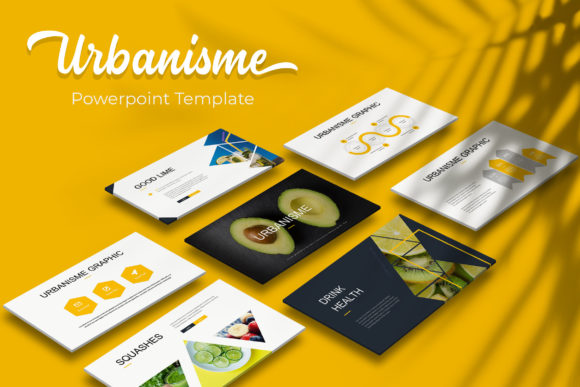
With 150 total slides distributed across five distinct color variations, the Urbanisme Power Point Template gives you 30 slides per template. That means you get a full deck structure repeated in multiple colorways, so you can pick the palette that fits your brand, your audience, or the tone of your message without rebuilding the layout. The five premade colors cover a range of moods from neutral and professional to bold and creative. This variety alone saves significant setup time, especially if you frequently present to different stakeholders or industries.
Beyond volume, the template includes handcrafted infographics, section break slides, gallery and portfolio layouts, and resizable, editable graphics. Each element is built on master slides, so any change you make to a master layout updates across the entire deck. This feature is particularly valuable when you need to maintain consistent headers, footers, or brand colors throughout a long presentation. The drag-and-drop picture placeholders make inserting your own images simple, and the pixel-perfect illustrations ensure that visuals stay crisp whether you present on a laptop screen or a large projector.
Why Slide Variety Matters for Real Projects
A one-size-fits-all slide deck rarely works well for varied use cases. When you are presenting a quarterly business review, you need data-heavy slides with clear charts and key takeaways. When you are showcasing a portfolio of design work, you need visually spacious slides that let images breathe. The Urbanisme Power Point Template addresses both scenarios within the same system. The gallery and portfolio slides are designed specifically for visual content, giving you a professional framework for images, mockups, and project samples. Meanwhile, the infographic slides help you turn complex information into digestible visuals that your audience can follow without confusion.
For educators and trainers, the section break slides provide natural pauses between topics. These slides help signal a shift in subject matter, which keeps learners oriented throughout a longer session. Entrepreneurs and small business owners will appreciate being able to repurpose the same template for different audiences by simply switching the color variation. A tech startup might use the cooler tones for investor meetings and the warmer palette for customer workshops, all while maintaining the same slide structure.
Efficiency Through Editable and Resizable Components
One of the most practical benefits of this template is that every graphic and element is resizable and editable without losing quality. You are not stuck with fixed shapes or unchangeable diagrams. If an infographic needs to emphasize a different data point, you can adjust colors, text, and icons directly. If a layout feels too cramped for your content, you can stretch elements to fit. This flexibility is a direct time saver because you do not need to recreate graphics from scratch or search for compatible illustrations elsewhere.
The drag-and-drop picture placeholder feature works smoothly even for people who rarely use PowerPoint. Instead of adjusting image sizes manually and hoping they align, you simply drop your photo into the designated placeholder, and it snaps into the correct dimensions. This reduces friction when preparing presentations under tight deadlines. Freelancers and marketers who juggle multiple client projects will find this particularly helpful, as it allows them to produce polished decks quickly without cutting corners on visual quality.
Pixel-Perfect Illustrations and Master Slide Consistency
Visual inconsistency can undermine even strong content. When slide fonts vary, images appear stretched, or alignment shifts from page to page, your audience may perceive the presentation as less professional. The Urbanisme Power Point Template addresses this with pixel-perfect illustrations and a master slide architecture that enforces visual harmony across the entire deck. Every element has been designed to align properly, so you do not waste time micro-adjusting positions.
Master slides also mean that any global changes, such as updating a company logo, changing the background color, or adjusting the font scheme, propagate automatically to all slides that inherit that master. This is especially useful for organizations that maintain strict brand guidelines or for anyone who needs to create template libraries for a team. Once you set up the master slides with your brand assets, every new presentation based on the template will already be compliant.
Who Benefits Most from This Template
Professionals who deliver presentations regularly will see the most value from the Urbanisme Power Point Template. Marketing managers presenting campaign results, consultants pitching strategic recommendations, and agency creatives showcasing portfolios all need a reliable visual structure that adapts to different content types. The template supports these use cases without forcing you into a rigid format.
Bloggers and content creators who produce video presentations, webinars, or slide-based social media content will also benefit from the widescreen format. The five PPTX widescreen files are ready for modern screen ratios, so your slides look right on YouTube, Zoom, or presentation software without awkward cropping. Hobbyists and educators who create learning materials or community presentations will appreciate the infographic tools that make data more accessible to their audience.
Small business owners who may not have a dedicated design team can use this template to maintain a professional image across sales decks, investor updates, and team meetings. The premade colors reduce the risk of poor color choices, and the editable graphics let you customize content to match your voice without needing advanced design skills.
Practical Setup and Included Resources
When you download the Urbanisme Power Point Template, you receive five PPTX files, each corresponding to one of the five premade colors. All files are in widescreen format, which is the standard for most modern displays and projectors. A Readme First document guides you through the setup, including which free font is used and where to download it. The font link is included so you can match the typography exactly as intended, and all fonts mentioned are free, which keeps your costs low.
It is important to note that the photographs and pictures shown in the preview images are for illustration only and are not part of the download. This is standard practice for professional templates, but it does mean you will need to supply your own images. The picture placeholders are designed to make this step easy, so you can replace demo visuals with your own content in seconds. If you need stock photography, many free and paid resources are available, and the template will work with any images you choose.
Limitations and Fit Considerations
No single template fits every situation perfectly. While the Urbanisme Power Point Template offers excellent variety and structure, users who need highly specialized slide types, such as interactive dashboards or advanced data animations, may need to supplement the template with custom elements. The template is built in standard PowerPoint, so it supports animations and transitions available in that environment, but it does not include custom code or macro-driven interactivity.
Additionally, if your presentation demands a very specific brand color that does not match any of the five provided variations, you can edit the colors manually, but this requires some familiarity with PowerPoint's color settings. For most users, one of the five palettes will be close enough to adapt quickly, but those with strict color requirements should expect a few minutes of adjustment.
When comparing options, consider the frequency and variety of your presentations. If you need one deck for a single event, a smaller template might suffice. But if you regularly produce multiple presentations for different audiences, the 150-slide, five-color structure of the Urbanisme Power Point Template provides a reusable system that saves time and maintains consistency across all your work.
Final Thoughts on Choosing the Right Template
A good presentation template does not just make slides look better; it reduces the time between thinking about your content and delivering it effectively. The Urbanisme Power Point Template achieves this by combining volume, variety, and thoughtful design into a single package. The handcrafted infographics, master slide consistency, and drag-and-drop placeholders address the most common friction points that slow down presentation creation. By choosing a template that aligns with your typical use cases, you free up more mental energy to focus on your message, your data, and the outcomes you want to achieve with your audience.