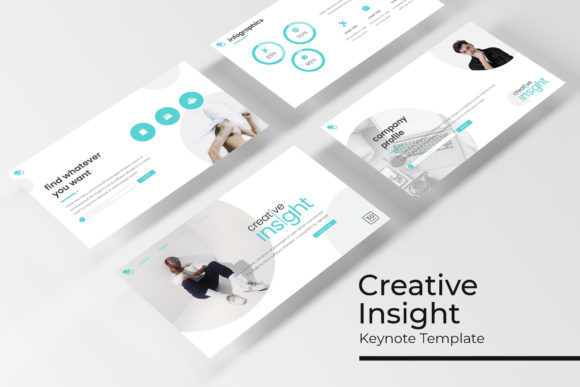
Creative Insight Keynote Template: A Practical Workflow for Polished Presentations
Building a presentation that communicates clearly and looks professional is a balancing act. You need to shape your message, structure your data, and design visuals that support your narrative without distracting from it. When you are working under a deadline, the design phase often becomes a bottleneck. The gap between a solid outline and a finished slide deck is where many good ideas lose their momentum. This is where the Creative Insight Keynote Template fits into a broader workflow. It provides a modular design system that lets you shift your focus from formatting slides to refining your argument.
This template is not a finished presentation. It is a toolkit consisting of 150 slides, organized into five distinct color variations of 30 slides each. It includes handcrafted infographics, section breaks, portfolio and gallery layouts, master slides, and drag-and-drop picture placeholders. The real value lies not just in these features, but in how you integrate them into your preparation, execution, and follow-up processes.
Integrating the Template into Your Pre-Production Process
The most effective presentations are built, not written. Before you open the template, you should have a clear narrative arc or a list of key takeaways. The Creative Insight Keynote Template supports this pre-production phase by providing a structural framework. The inclusion of Section Break slides is particularly useful for storyboarding. You can quickly lay out a sequence of topic shifts, which helps you visualize the flow of your presentation before committing to detailed content.
During the planning stage, review the five premade color variations. Each 30-slide set functions as a standalone theme. Selecting one of these palettes early in your process forces a useful constraint. It defines the visual tone of your presentation before you start adding content, ensuring that every chart, image, and text block aligns with a cohesive mood. This is more efficient than choosing colors on a per-slide basis, which often leads to inconsistency. Consider your audience and venue when making your choice. A conservative board meeting might call for a muted, professional palette, while an internal creative review could benefit from a more vibrant scheme.
The template also requires a small amount of upfront preparation. The included Readme First file outlines the fonts used, along with a link for free download. Installing these fonts before you begin work prevents layout shifts and ensures the typography behaves as intended across all 150 slides. This is a simple compatibility step that saves time troubleshooting later.
How the Template Functions During Active Presentation Building
Once your narrative is sketched and your tools are ready, the template transitions into a production asset. The design is built on Master Slides, which is the most important feature for long-term efficiency. By editing the Master Slides, you can apply global changes to typography, background elements, and logo placement across every slide in your chosen 30-slide set. This guarantees visual consistency without requiring you to adjust each slide individually. It is a quality control mechanism that protects your brand integrity throughout the build process.
The drag-and-drop picture placeholders are another practical time-saver. Instead of manually cropping and resizing images, you simply drag a photo or graphic into the designated area. This reduces friction when iterating on visual choices. You can test multiple images in the same layout within seconds, allowing you to select the one that best supports your message. This workflow is especially useful for gallery and portfolio slides, where the visual hierarchy is predetermined. You can focus on curating the best images rather than designing a new layout for each one.
Using Infographics to Clarify Data
Data visualization is often treated as an afterthought, but the handcrafted infographics in this template encourage you to integrate it into your core narrative. Instead of pasting a spreadsheet, you can use these pre-built infographic elements to transform raw numbers into digestible visual stories. The key is to match the infographic style to your specific data point, not to force your data into a graphic that doesn't fit. The template provides multiple chart and diagram styles, so you have options for comparisons, proportions, and trends. This saves the time it would take to build these visualizations from scratch using Keynote’s native tools.
Post-Presentation Asset Management and Reusability
A common inefficiency in presentation work is starting from zero for every new project. The Creative Insight Keynote Template is designed as a reusable system. Once you have delivered a presentation, the .key file becomes a valuable archive. You can extract specific slides, such as an infographic or a portfolio layout, to use in future projects. Over time, you build a library of high-quality, on-brand slides that reduce the production time for each subsequent deck.
For teams, maintaining a standardized template is a practical workflow improvement. When multiple people need to create presentations for the same department or client, the five distinct color variations allow for visual segmentation without straying from the core design language. One team might use a specific color for monthly reports, while another uses a different palette for client pitches. This organizational consistency makes it easy to identify the purpose of a presentation at a glance.
Practical Implementation Tips for Different Professional Contexts
The value of this template changes depending on your role and workflow. A marketer preparing a monthly campaign recap can use the section breaks to separate channels, the infographics to show performance metrics, and the gallery slides to showcase creative assets. The structure allows the report to tell a story, guiding the reader from strategy to execution to results.
An educator or course creator can leverage the template to build consistent lecture modules. By using one of the five color variations per course unit, students benefit from a clear visual signal that a new topic is beginning. The drag-and-drop placeholders make it easy to integrate diagrams and screenshots without disrupting the layout. This reduces the cognitive load on the audience, allowing them to focus on the content rather than the changing slide formats.
For freelancers and small business owners, the portfolio and gallery slides are direct business assets. You can curate case studies, past projects, or product images into a clean, professional showcase. This is particularly useful for pitch decks or client onboarding materials. The template provides a polished wrapper for your work, which reinforces your credibility without requiring you to invest hours in custom slide design.
Managing the 150-Slide Library Efficiently
A common question when faced with a large template is how to stay organized. The 150 slides are divided into five files of 30 slides each. You do not need to load all 150 slides into a single document. Instead, choose the color variation that fits your project and open that specific .key file. If you need a slide from a different color variation, such as a specific infographic, you can copy it directly from the other file. This modular approach keeps your working file manageable while giving you access to a broad library of layouts. The five premade colors act as a taxonomy, making it easy to quickly find the right slide for your needs.
Maintaining Quality Control and Long-Term Consistency
Consistency is the hallmark of a professional presentation. The Creative Insight Keynote Template enforces this through its Master Slides and pixel-perfect illustrations. When you maintain the integrity of the master layout, every slide you add will align with the grid and typography of your chosen set. This eliminates the common problem of slides that feel disconnected from one another.
The pixel-perfect illustrations also contribute to quality control. Because they are designed to scale properly within the Keynote environment, you do not have to worry about low-resolution artifacts or mismatched visual styles. This allows you to focus on the clarity of your message, trusting that the visual framework will support it effectively. Over the long term, using a consistent template like this helps establish a recognizable visual identity for your personal brand or organization.
By treating the Creative Insight Keynote Template as a practical system rather than just a collection of pretty slides, you streamline your entire presentation workflow. You reduce time spent on formatting, improve the consistency of your output, and free up mental energy to focus on what matters most: communicating your ideas with clarity and impact.