Crafting Professional Presentations with the Sporty Keynote Template
Understanding the Core Design Philosophy
The Sporty Keynote Template represents a shift toward modular, user-centric presentation design. Instead of forcing creators into rigid layouts, this template package offers 150 total slides distributed across five distinct color variations. Each variation contains 30 slides, giving presenters a complete ecosystem for building coherent narratives without starting from scratch. The underlying logic emphasizes consistency: every slide, whether a section break, a gallery page, or an infographic, shares typographic rhythm and spatial balance. This means that even users with minimal design experience can produce presentations that feel cohesive and intentionally crafted.
What sets this approach apart is the reliance on master slides. By anchoring every layout to a master, the template ensures that changes made to fonts, background colors, or spacing propagate uniformly. This is particularly valuable for teams collaborating on a single deck, as it eliminates the inconsistencies that creep in when multiple people edit individual slides. The master-based architecture also makes global branding updates effortless: adjust the master once, and all linked slides reflect the change.
Navigating the Five Color Variations
The template ships with 5 premade colors and five corresponding KEY files (plus widescreen variants). Each color scheme is not merely a palette swap but a carefully balanced combination of primary, secondary, and accent hues. For example, one variation might favor high-contrast blacks and whites for corporate settings, while another uses muted earth tones for environmental or lifestyle presentations. The availability of 30 slides per color template means that users can pick a scheme aligned with their brand or message without needing to manually recolor elements.
This color flexibility directly addresses a common pain point: the time wasted adjusting templates to match existing brand guidelines. By providing five ready-to-use schemes, the Sporty Keynote Template reduces that friction. If a user needs a specific custom color, the editable graphics and master slides make modification straightforward. The result is a presentation that looks bespoke without requiring a designer’s intervention.
Handcrafted Infographics and Visual Communication
One of the strongest features is the handcrafted infographic assets built into the template. These are not generic charts or clip art but thoughtfully designed visual elements that can represent processes, hierarchies, timelines, and data distributions. Because they are created as vector-based graphics, they remain resizable and editable without losing quality. This is critical for presentations that will be projected on large screens or exported to high-resolution formats.
Infographics serve a dual purpose: they explain complex information quickly and they add visual interest that keeps audiences engaged. The Sporty Keynote Template includes these as part of its core offering, meaning users can drag and drop data into pre-built frameworks instead of constructing visuals from scratch. For educators and researchers, this feature alone can cut preparation time in half. For business owners, it means boardroom presentations can include sophisticated diagrams without hiring a graphic designer.
Section Breaks and Structural Flow
A well-structured presentation needs clear transitions between topics. The template provides dedicated section break slides that act as visual pauses. These slides are designed to reset the viewer’s attention, signaling a shift in focus. Each section break incorporates the color scheme and typography of the overall template, so they feel like natural dividers rather than afterthoughts. Users can customize the text on these slides to reflect chapter titles, speaker names, or thematic markers.
In practice, section breaks improve audience retention. When viewers know that a new segment is beginning, they mentally prepare to absorb new information. The Sporty Keynote Template leverages this psychological cue, making it easier for presenters to organize long-form content without losing coherence. Combined with the gallery and portfolio slides described below, these breaks create a rhythm that guides the audience from start to finish.
Gallery and Portfolio Slides for Visual Showcasing
For creators, photographers, architects, and product managers, the ability to showcase visual work is essential. The gallery and portfolio slide layouts in this template are designed with image-heavy content in mind. They include multiple picture placeholders that support drag-and-drop insertion, meaning users can populate them quickly with their own photographs or product shots. The placeholders are built on master slides, so resizing or repositioning them maintains alignment across the entire deck.
These gallery slides are not simple grids. They include variations like two-up layouts, three-column arrangements, and full-bleed hero images with overlaid text. This variety allows presenters to sequence images in ways that tell a story. For example, before-and-after shots can be paired side by side, or a product line can be shown in a staggered progression. The portfolio layouts also work well for case studies, where each slide features a client logo, a project image, and a brief description.
Resizable and Editable Graphics with Pixel-Perfect Precision
Every graphic element in the Sporty Keynote Template is described as pixel-perfect illustrations. This means icons, shapes, and decorative elements are crafted with attention to alignment, stroke weight, and spacing. When users resize these elements, they do not become fuzzy or misaligned because the vector foundations preserve clarity. For presentations that will be viewed on retina displays or printed as handouts, this level of detail matters.
The editable graphic nature of these assets also allows for deep customization. Colors can be changed to match brand palettes, elements can be grouped or ungrouped, and individual components can be repositioned. This contrasts with static image-based templates where changes are impossible without external software. For advanced users, this opens up possibilities like building custom diagrams or combining elements from multiple slides into entirely new layouts.
Additionally, the inclusion of 5 KEY files and 5 KEY widescreen versions ensures compatibility with both standard and widescreen projectors. The widescreen variants are particularly relevant for modern conferences and webinars where 16:9 aspect ratios are the norm. Users simply choose the file that matches their output device, avoiding the awkward letterboxing or stretching that occurs when aspect ratios mismatch.
Practical Workflow for Different Users
The real-world utility of this template becomes clear when examining how different professionals can integrate it into their workflows.
Business Owners and Executives
For quarterly reviews or investor pitches, time is often limited. The Sporty Keynote Template allows executives to start with a polished foundation. They can select a color variation that aligns with their company branding, populate the section breaks with key milestones, and use the infographic slides to present financial data or market trends. The portfolio slides can showcase product lines or service offerings. Because the template includes 30 slides per color, there is ample room to cover multiple topics without running out of layouts.
Educators and Researchers
Academic presentations require clarity and depth. The handcrafted infographics are ideal for illustrating scientific processes, historical timelines, or statistical comparisons. Researchers can use the gallery slides to display experimental setups, field photographs, or data visualizations. The section breaks help separate introduction, methodology, results, and discussion sections, which is a standard structure in academic conferences. The editable nature of the graphics also means that complex diagrams can be simplified or annotated as needed.
Creative Professionals
Photographers, designers, and artists will find the portfolio slides particularly useful. The drag-and-drop picture placeholders make it quick to swap in new work. The pixel-perfect illustrations ensure that even decorative elements look crisp. The five color variations allow creatives to choose a background that complements their work without overpowering it. For client pitches, the professional polish of the template can help establish credibility.
Marketing and Sales Teams
Sales decks need to be persuasive and visually engaging. The Sporty Keynote Template provides a structure that balances text and imagery. Team members can use the infographic slides to illustrate ROI, market positioning, or competitive advantages. The gallery layouts work well for client testimonials or before-and-after case studies. Because the template is easy to edit, last-minute changes are feasible without breaking the design consistency.
Considerations When Using the Template
No template is a perfect fit for every scenario, and understanding the limitations helps users get the most out of the package. The Readme First file included with the download contains crucial information about font licensing and installation. The template uses specific fonts that are not pre-installed on every system; the free font download link provided in the Readme must be used to ensure the slides render as intended. Ignoring this step can result in fallback fonts that disrupt the carefully designed typography.
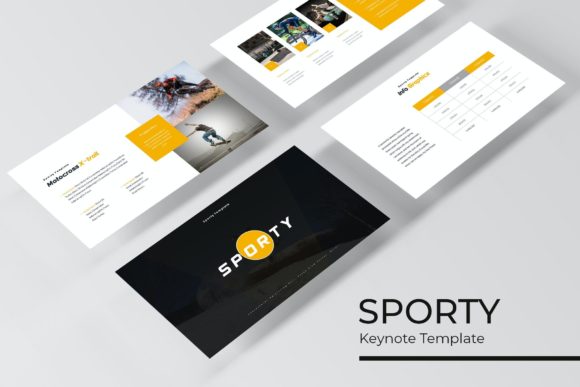
Another consideration is that all photographs or pictures used in the preview are not included. The preview images are for illustration purposes only. Users must supply their own images, which is standard practice for premium templates. The picture placeholders are sized to common aspect ratios, so users should prepare images that match those dimensions to avoid cropping surprises. The drag-and-drop functionality works best when images are already cropped to the appropriate shape.
Additionally, while the template is built on master slides, users who are unfamiliar with Keynote’s master slide system might need a brief learning period. The documentation in the Readme file provides guidance, but new users should experiment with a copy of the template before committing to final content. This is a minor hurdle, and once mastered, the efficiency gains are substantial.
Comparing to Other Presentation Approaches
Many presentation tools offer templates, but few provide the level of granular control found in this package. Standard templates often include 10-20 slides with limited variation. The Sporty Keynote Template, with its 150 total slides and five color variations, offers a breadth that supports longer presentations or multiple projects with consistent branding. The inclusion of handcrafted infographics and section breaks further distinguishes it from basic templates that rely on clip art or simple text slides.
Another advantage is the focus on vector-based, editable graphics. Many competing templates use raster images that cannot be resized without quality loss. The pixel-perfect illustrations in this package maintain their sharpness regardless of scaling, which is essential for professional environments where image quality reflects on the presenter’s credibility.
Final Observations on Practical Use
The most effective presentations are those where the audience focuses on the content rather than the slide design. The Sporty Keynote Template achieves this by providing a clean, consistent visual framework that recedes into the background. Users can invest their energy in refining their message, knowing that the supporting visuals will remain coherent and polished.
For anyone who regularly creates presentations, whether for board meetings, academic conferences, client pitches, or educational workshops, the template offers a reliable foundation. The combination of 150 slides, five color variations, handcrafted infographics, and pixel-perfect illustrations reduces the gap between amateur and professional output. The drag-and-drop picture placeholders and master slide architecture further streamline the creation process.
Ultimately, the value of any template lies in how it improves the user’s workflow and final output. By removing repetitive design decisions and ensuring visual consistency, the Sporty Keynote Template allows presenters to focus on what truly matters: communicating their ideas effectively. The included fonts, color schemes, and layout options provide a starting point that can be adapted to countless contexts, making it a versatile tool in any presenter’s toolkit.