Parking Application Mobile UI Kit
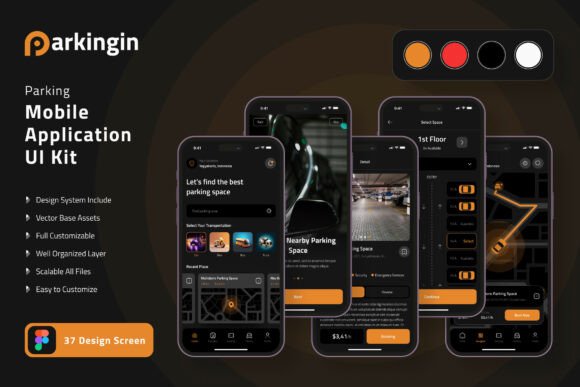
Building a mobile app from scratch takes time, skill, and a clear vision. For parking-related applications, the user interface plays a central role in how drivers experience the service. A cluttered or confusing screen can frustrate users, while a clean, intuitive layout makes finding parking quick and stress-free. The Parking Application Mobile UI Kit offers a practical shortcut for anyone looking to design or build a parking app without starting from zero. With 37 pixel-perfect screen designs, 80 UI elements, and 100 vector layers, this kit provides a solid foundation that you can adapt to your specific needs.
Whether you are a designer, developer, entrepreneur, educator, or someone exploring app creation for the first time, understanding what this kit includes and how it fits your workflow can help you decide if it matches your project. This article walks through the kit’s features, who may find it useful, and what to consider before using it.
What the Parking Application Mobile UI Kit Offers
At its core, this UI kit is a collection of ready-made screen templates designed for parking applications. The templates cover common screens such as parking spot selection, payment confirmation, reservation details, user profile, and navigation maps. Each screen is crafted with attention to spacing, typography, and visual hierarchy, so you can focus on functionality rather than starting from a blank canvas.
The kit includes 80 UI elements like buttons, input fields, toggle switches, search bars, and progress indicators. With 100 vector layers, you have control over every component, from icons to background shapes. All elements are fully layered and organized, making it easy to hide, adjust, or replace parts without breaking the overall design. The templates are available for Figma, a popular design tool that runs in the browser and works across operating systems. A free font is included, and the vector icons are scalable, so resizing for different screen sizes does not affect quality. Changing color styles is straightforward, allowing you to align the design with your brand identity.
Note that the preview images in the kit are for illustration only and are not part of the download files. The actual templates are clean and ready for you to customize.
Designers Looking for Efficiency
For designers, time is often the most limited resource. Starting a project from scratch means creating every button, input field, and screen layout individually. The Parking Application Mobile UI Kit gives you a head start with professionally designed screens that follow mobile design best practices. You can open the file in Figma and immediately see how the components are structured. The vector layers are named and grouped logically, which speeds up the process of finding and editing specific elements.
If you work on multiple client projects or need to deliver a parking app mockup quickly, this kit can reduce your production time significantly. You can also use it as a teaching tool to show junior designers how common UI patterns are built. The pixel-perfect screens ensure that your output looks polished, and the scalable vectors mean you can adapt the design for different device sizes without losing clarity.
Developers Who Want a Clear Reference
Developers may not always focus on visual design, but having a clear UI reference helps when translating designs into code. The Parking Application Mobile UI Kit provides a consistent visual language that you can use as a guide for layout, spacing, and component behavior. When you have 37 screen templates to refer to, you can understand the flow of the application and anticipate how different screens connect.
The fully layered structure also helps if you need to export assets or inspect specific measurements. You can quickly check the padding between elements, font sizes, or color values. This reduces back-and-forth communication with designers and speeds up the development cycle. If you are building a prototype for a client or your own startup, having a ready-made UI kit can help you focus on backend logic and functionality rather than pixel-pushing.
Entrepreneurs and Startup Founders
If you are launching a parking-related service, your app’s first impression matters. Users decide within seconds whether an app looks trustworthy and easy to use. The Parking Application Mobile UI Kit allows you to present a professional-looking design without hiring a full design team upfront. You can customize the templates to match your branding, add or remove screens as needed, and create a prototype that investors or early users can interact with.
For a founder with limited budget, this kit offers a cost-effective way to test your idea. Instead of spending weeks designing screens from nothing, you can start with a proven layout and adjust it based on user feedback. The 80 UI elements cover most interactions a parking app needs, so you can focus on refining the user experience rather than building basic components. The commercial value lies in the speed of iteration: faster design cycles mean faster validation of your business concept.
Small Business Owners and Local Services
Small business owners who run parking lots, garages, or valet services may want a mobile app to streamline reservations and payments. However, hiring a designer or agency can be expensive. The Parking Application Mobile UI Kit gives you a starting point that you can hand off to a freelance designer or developer. Because the templates are fully editable in Figma, you can explain what changes you want without needing design skills yourself.
You can also use the kit to create consistent branding across your app and website. The easy-to-change color style means you can match the app to your existing brand colors. This consistency builds trust with customers and makes your service look professional. If you plan to expand to multiple locations, the modular design of the kit allows you to reuse components and maintain a uniform look across different screens.
Educators and Students
For educators teaching mobile design or UX courses, the Parking Application Mobile UI Kit can serve as a real-world example of how a functional app is structured. You can walk students through the screens, explain why certain elements are placed where they are, and show how a design system works in practice. The 100 vector layers and 80 UI elements give students plenty of material to explore and modify.
Students learning Figma or mobile design can use the kit as a practice project. They can try changing the color scheme, rearranging layouts, or adding new screens. This hands-on experience helps build confidence and portfolio pieces. The free font and scalable vectors remove licensing concerns, making the kit suitable for educational use without additional costs.
Freelancers and Agencies
Freelancers and design agencies often need to produce high-quality work under tight deadlines. The Parking Application Mobile UI Kit can serve as a foundation for client projects, especially when the client wants a parking app but has a limited budget. You can use the templates as a base, then layer on custom branding and unique features. The 37 screens cover most common use cases, so you can present a comprehensive design to the client quickly.
The fully layered and organized file structure makes it easy to collaborate with other team members. You can share the Figma file, allow edits, and maintain version control. The pixel-perfect quality ensures that the final output meets professional standards, and the 100 scalable vectors mean you can produce assets for various screen densities without rework.
Key Features and What They Mean for Your Workflow
- 37 pixel-perfect screen designs: Each screen is crafted with precision, so you do not need to adjust alignment or spacing manually. This helps both beginners who want a reliable starting point and professionals who need consistent output.
- 80 UI elements and 100 vector layers: The kit includes a wide range of components. Designers can mix and match elements to create new screens, while developers can use the layers to understand the visual structure.
- Fully editable in Figma: Figma runs in a browser and is free to use. This lowers the entry barrier for beginners and allows teams to collaborate in real time.
- 100 scalable vectors: Icons and shapes retain quality at any size. This is useful for responsive design and for exporting assets for different devices.
- Easy color style changes: You can update the entire app’s color palette in a few clicks. This is especially valuable for brands that need consistency across multiple touchpoints.
- Free font included: No additional licensing costs. This benefits students, freelancers, and small businesses working with limited budgets.
- Symbol objects and fully layered files: These features speed up editing and reduce the chance of breaking the design. Beginners can experiment safely, and professionals can work efficiently.
Practical Examples for Different User Types
Consider a freelance designer who has just received a request for a parking app prototype. Instead of designing each screen from scratch, they open the Parking Application Mobile UI Kit in Figma. They select the screens that match the client’s requirements, adjust the color palette to match the client’s brand, and replace placeholder icons with custom ones. Within a day, they have a clickable prototype that the client can test. The freelancer saves hours of work and delivers a polished result.
Now think about a student learning mobile design. They download the kit and explore how the screens are layered. They try changing the background color, modifying button styles, and adding new text fields. Through this process, they learn about component hierarchy, spacing, and typography. The kit becomes a practical learning resource that goes beyond theory.
For a startup founder, the kit helps with early validation. They can create a landing page with app screenshots generated from the templates, show the flow to potential users, and collect feedback. The 37 screens cover enough scenarios to test core assumptions about the app’s usability. If the feedback suggests changes, the founder can edit the templates quickly and create a new version for testing the same week.
A small parking lot owner may want a simple app where customers can reserve a spot and pay. They hire a developer and hand over the UI kit as a reference. The developer uses the templates to build the front end, ensuring the final app looks exactly as planned. The owner gets a professional app without needing to manage the design process themselves.
Is This UI Kit Right for Your Project
Choosing a UI kit depends on your goals, skills, and timeline. If you need a complete set of parking app screens that you can customize quickly, this kit provides a strong foundation. The 37 templates cover most standard screens, and the 80 UI elements give you flexibility to create variations. The Figma format means you can collaborate with others easily, and the free font and scalable vectors remove common barriers.
If you are a beginner, the fully layered structure and easy color changes reduce the learning curve. You can focus on understanding how screens connect rather than struggling with design tools. If you are a professional, the pixel-perfect quality and organized layers help you maintain high standards while saving time.
However, if your app requires very specialized screens that differ significantly from typical parking app flows, you may need to create additional custom screens. The kit is a starting point, not a one-size-fits-all solution. Also, keep in mind that the preview images are for illustration only, so download the file to see the actual templates.
Overall, the Parking Application Mobile UI Kit is a practical resource for anyone involved in building a parking application. It balances quality, flexibility, and ease of use, making it suitable for a wide range of users from beginners to seasoned professionals. By starting with a well-designed foundation, you can focus more on solving real user needs and less on repetitive design tasks.