Real Estate Marketing Social Banner: A Practical Tool for Realtors, Agents, and Marketers
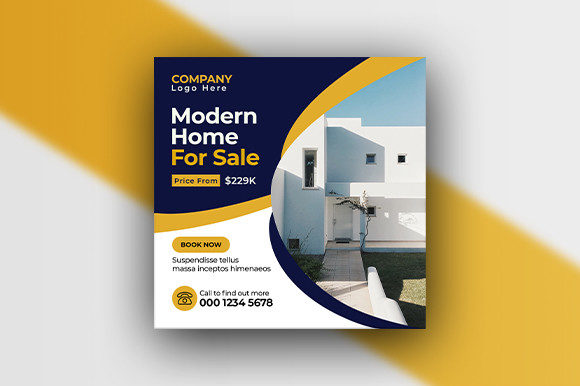
If you’ve ever tried to create a social media post for a property listing from scratch, you know it can eat up a whole afternoon. Between choosing the right dimensions, matching brand colors, finding fonts that don’t clash, and making sure everything looks crisp on a phone screen, it’s easy to feel stuck. That’s where a ready-made design asset like the Real Estate Marketing Social Banner comes in. Think of it as a flexible starting point—a template built specifically for real estate promotions on social platforms, packaged in a way that anyone with basic design skills can tailor to their needs.
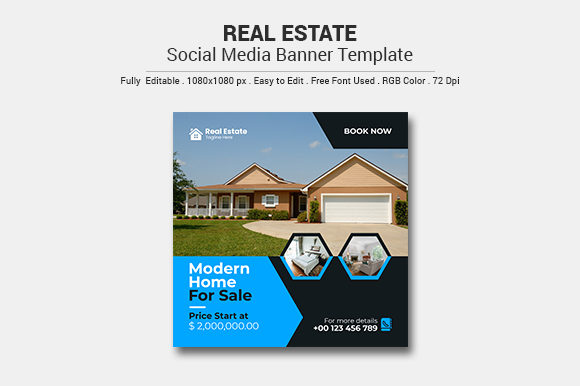
This particular banner comes as an Adobe Illustrator file (both AI and EPS, CS6 compatible), set at 1080×1080 pixels, 72 DPI, and RGB color mode. Those specs might sound technical, but they simply mean the file is optimized for digital use—perfect for Instagram, Facebook, LinkedIn, or any other square-format social post. You edit the text, swap the placeholder image, adjust the colors, and you have a professional-looking ad in minutes. No need to start from zero or fiddle with complicated software settings.
Where and When People Actually Use This Banner
The real value of a template like this shows up in the day-to-day scenarios that real estate professionals, marketers, and even casual sellers face. It’s not about having a one-size-fits-all solution; it’s about having a reliable frame that you can adapt quickly.
Property Listings
The most obvious use case is promoting a specific home. Whether you’re an agent posting a new listing on Instagram or a homeowner trying to sell by owner, you want the post to look credible. With the banner, you input the property address, price, key features, and maybe a call to action like “Schedule a tour.” The template ensures your text is readable, the layout is balanced, and the overall feel is professional. You can even keep a consistent look across multiple listings by using the same template with different property photos.
Open House Announcements
Open house events need clear, eye-catching social posts that include date, time, and location. The 1080×1080 square format works great for both feed posts and stories if you crop it slightly. A banner like this lets you highlight the open house details without overwhelming the viewer. Swap the background image with a shot of the property’s best angle, tweak the colors to match your brokerage brand, and you’re ready to go.
Market Updates and Neighborhood Spotlights
Real estate isn’t just about individual homes. Many agents build authority by sharing local market trends—like “Home prices in Oakwood rose 5% this quarter” or “Top 3 things to know before buying downtown.” The banner can be repurposed as a visual for these educational posts. Instead of stock photos, you might use a neighborhood skyline or a simple graphic background. The RGB color mode ensures your charts and data visuals look vibrant on screens, and the 72 DPI keeps file sizes manageable for quick uploads.
Brand Awareness and Agent Introductions
New agents, or agents trying to establish a consistent online presence, can use the banner for introductory posts. “Meet your new local agent” posts, contact information cards, or simple “I’m here to help” graphics are easy to produce. Because the file is fully editable in Illustrator, you can add your logo, headshot, and personal tagline. The readme file even provides the font name and download link, so you can match the template’s typography or swap it for something that better represents your style.
Coordination for Brokerage Teams
Small real estate teams often struggle to keep social posts looking uniform when multiple people are posting. By sharing this banner template—with locked color swatches and logo placement—team members can create individual posts that still look cohesive. The included AI CS6 and EPS files make it easy to share across different systems. No one needs the latest software version; CS6 files open in most modern versions of Illustrator. This consistency builds trust with followers who recognize the team’s style.
Freelancers and Designers Serving Real Estate Clients
If you’re a freelance graphic designer or social media manager, a template like this saves you from reinventing the wheel every time a real estate client asks for a social post. You can purchase the file once, then create multiple variations for different clients by changing colors, fonts, and images. Because images are not included in the download, you’ll source your own stock photos or client-provided property shots. This gives you control over copyright and ensures each version feels unique.
Bloggers and Educators
Real estate bloggers, educators, and YouTube creators also find value in these banners. They can use them for thumbnails, event announcements, or promotional graphics for digital courses about buying or selling homes. The square format works well for pinning images on Pinterest or sharing in online communities. The 72 DPI resolution is perfectly adequate for web use, keeping the file lightweight and fast to export.
How the Features Translate to Real Outcomes
Let’s connect the listed features to what they actually mean for your workflow.
- Easy to edit – The layers and objects in the AI file are likely organized logically (text on top, shapes below, backgrounds separate). You don’t need to be a design guru; just double-click text with the Type tool, type your message, and adjust font size if needed. This saves hours of formatting.
- Optimized for design at 72 DPI – 72 DPI is the standard for web and social media. It means the file is not unnecessarily large, so your computer won’t lag when editing, and the output will load quickly on mobile networks.
- RGB color mode – Screens display colors using RGB. Using this mode means the bright reds, blues, and greens on your banner appear vibrant. If you printed it (though not intended), colors might look different, but for social posts, RGB is exactly what you need.
- 1080×1080 pixel dimension – This is the sweet spot for square social posts. Instagram, Facebook, and even LinkedIn support this size natively. The resolution is high enough to look sharp on Retina displays but not so large that uploads take forever.
- Adobe Illustrator CC version – AI CS6 and EPS CS6 files – CS6 is a widely compatible format. Even if you’re using a newer version of Illustrator (like CC 2020 or 2024), you can open the CS6 file without conversion issues. The EPS option adds another layer of compatibility if you’re using other vector editing programs.
- Readme file included with font details – The readme tells you exactly which fonts are used and where to download them (often free or common ones). This prevents that annoying moment when you open a template and all the text turns to missing glyph boxes. Just install the fonts, and everything lines up perfectly.
What to Consider Before Downloading or Using the Banner
Before you grab this template, think about a few practical points to make sure it fits your situation.
- You need Adobe Illustrator – This banner is not a Canva or Photoshop file. You’ll need Illustrator (or an alternative that can open AI/EPS) to edit it. If you’re comfortable with vector editing, great. If you’ve never used it, the learning curve is mild for basic text and color changes—just follow a quick tutorial.
- Images are not included – The download provides the design framework only. You’ll supply the property photos, headshots, or background imagery. That’s actually a perk: you avoid licensing issues and can choose exactly the image that matters for your post.
- Font installation – The readme gives you the font name and link. Make sure to download and install the font before you open the file. Otherwise, Illustrator might substitute a different font, and the layout could shift. It’s a one-time setup that takes two minutes.
- Customization beyond text – If you want to change element colors, learn how to use the Color Picker or swatches in Illustrator. The template likely uses global swatches, so updating the primary color will update all matching elements automatically. This is a huge time-saver once you get the hang of it.
- Consistency with your branding – For agents and teams, decide early on which elements are “locked” (like the logo position) and which can vary (like the property image). Sticking to a consistent color palette and font family across all posts builds recognition.
Also consider the platform you’re posting to. While 1080×1080 is ideal for static feed posts, Instagram Stories use 1080×1920. If you plan to use the banner for stories, you might need to resize it slightly—but the design elements can be adapted by extending the background. The vector file makes that scaling straightforward.
Getting Started: A Quick Workflow
Download the file. Open the readme first—install the recommended font. Then open the AI file in Illustrator. You’ll see a nicely structured document. Replace the placeholder image by dragging your own photo into the designated area (usually a clipping mask or a specific layer). Use the Type tool to edit the text layers. Change colors using the swatches panel. Export as PNG or JPG at 1080×1080 pixels (File > Export > Export for Screens). Upload to your social platform. Done.
If you’re handling multiple listings, duplicate the file and swap out the image and text each time. This creates a consistent thread in your feed that followers will recognize. Over time, you’ll develop a library of banners that you can reuse event after event.
Why This Approach Works for Real People
The beauty of a well-made template like this is that it removes the friction of designing from scratch while still giving you creative control. You don’t have to be a professional designer to produce something that looks clean and intentional. And because the file is built with the right technical specs (72 DPI, RGB, 1080×1080), you’re not fighting software or resizing issues right before a deadline.
For a busy real estate agent, that means less time stuck in design tools and more time showing homes or following up with leads. For a marketer managing multiple listings, it means consistent client-facing materials without shouting across the office to ask, “What font did we use last time?” For a homeowner selling their own place, it offers a chance to stand out with a professional-looking social post that doesn’t require hiring a graphic designer.
The template is a tool, not a crutch. You still need good photos, compelling copy, and a clear call to action. But it handles the heavy lifting of layout and specs, letting you focus on the message and the property. That’s a trade-off worth making.
If you’re ready to streamline your real estate social marketing, this banner gives you a proven structure to build on. Open the AI file, make it yours, and post with confidence.