Fashion Glow Landing Page: A Practical Tool for Modern Digital Projects
Landing pages remain one of the most reliable ways to present ideas, products, or services online. Whether you are launching a new collection, promoting a seasonal campaign, or building a personal brand, the right landing page template can save hours of development time and deliver a polished result. Fashion Glow Landing Page is a clean, professional template designed to help you showcase content with minimal friction. It is built for those who want a structured layout without needing to start from scratch.
Understanding What Fashion Glow Landing Page Offers
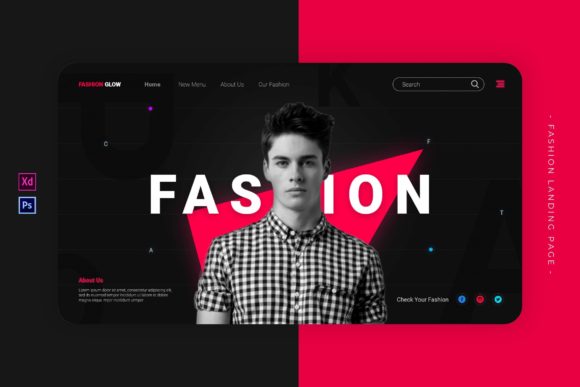
At its core, Fashion Glow Landing Page is a pre-designed template file available in PSD and XD formats. It comes with a fixed size of 1440 by 900 pixels, which is a common standard for web and presentation mockups. The layout is clean and modern, with paragraph styling, placeholder images, and free fonts already set up. This means you can focus on replacing content rather than worrying about alignment, spacing, or typography choices.
The template includes a main PSD file for Adobe Photoshop, an XD file for Adobe XD, and a readme document for guidance. The photos shown in the preview are not included, so you will need to supply your own imagery. This is typical for professional templates and gives you full control over the visual direction of your project.
Who Benefits from Using This Landing Page
This template is suitable for a wide range of users. Freelancers who need to present portfolio pieces quickly will appreciate the ready-made structure. Marketers running limited-time campaigns can adapt the layout to match seasonal themes. Educators and bloggers can use it to create visually consistent course landing pages or article headers. Even hobbyists experimenting with design tools can learn from studying the layer organization and style choices embedded in the file.
Because the template does not rely on complex scripting or platform-specific code, it works well for professionals who prefer static mockups before moving to development. You can hand off the PSD or XD file to a developer, or use it as a reference for building a live page with your preferred tools.
Practical Applications Across Different Scenarios
Consider a small business owner preparing a launch page for a new product line. With Fashion Glow Landing Page, they can place product images, a headline, and a call-to-action button in a layout that already feels balanced. Instead of spending days tweaking margins and font sizes, they can focus on writing persuasive copy and selecting strong visuals.
For a freelance designer pitching a branding package, the template serves as a presentation mockup. Drop in the client's logo, adjust the colors to match their palette, and show them how their brand could look in a dedicated landing environment. This kind of visual aid often speeds up approval processes and builds client confidence.
In an educational setting, an instructor teaching web design fundamentals can use the template to explain layout grids, visual hierarchy, and typography pairings. Students can open the file, experiment with layers, and see how small changes affect the overall feel. The included readme file also provides a starting point for discussing file management and version control.
Key Strengths and Notable Characteristics
One of the strongest aspects of this template is its focus on simplicity. The layout does not try to do too much. It provides a single page with enough structure to guide the viewer's eye without overwhelming them. The 1440 by 900 pixel size works well for both desktop mockups and tablet-oriented presentations. If you need multiple sections or longer content, you can duplicate and modify the existing artboards easily.
The use of free fonts is another thoughtful detail. You do not need to purchase additional licenses or hunt down obscure typefaces. This keeps the setup cost low and makes collaboration easier since team members can install the same fonts without legal concerns. The placeholder images are placed at standard aspect ratios, which helps you visualize how your own images will fit before you start replacing them.
The clean and modern style means the template can adapt to various industries. Fashion, beauty, lifestyle, technology, and even consulting services can use it with minimal changes. The paragraph style is set to a readable size and line height, which encourages visitors to actually read the content rather than skim past dense blocks of text.
Usability and Efficiency in Real Workflows
Time is often the most limited resource in any project. Having a pre-organized PSD or XD file with labeled layers and grouped elements reduces the time spent hunting for the right component. You can quickly locate the headline layer, swap out the background image, or adjust the button text without disturbing other parts of the layout.
For teams working remotely, XD files offer the advantage of shared links and comments. You can share a prototype with stakeholders, gather feedback directly on the design, and iterate without exporting multiple versions. The PSD file, on the other hand, remains a staple for those who prefer Photoshop's extensive raster editing capabilities, especially when working with complex photo retouching or texture overlays.
If you are a developer who needs to convert a design into HTML and CSS, having a pixel-precise PSD or XD file makes measurement and spacing decisions straightforward. You can inspect the distance between elements, note the font sizes, and replicate the layout with confidence.
Considerations When Choosing or Using This Template
While Fashion Glow Landing Page is versatile, it is important to understand its scope. It is a single-page layout of fixed dimensions. If you need a multi-page website or a responsive design that adapts to mobile screens, you will need to plan how to extend or adapt the design. The 1440 by 900 pixel size is best suited for desktop-first presentations. You may need to create additional artboards or layouts for smaller screens if your project requires full responsiveness.
The preview images are not included, so you must source your own photography or illustrations. This is actually a benefit in most cases, because it ensures your final product looks unique and aligned with your brand. Stock photo libraries, original photography, or AI-generated visuals can all fill the placeholder slots effectively.
Also, note that the template is provided in PSD and XD formats. You will need access to Adobe Photoshop or Adobe XD to open and edit the files. If you do not have a Creative Cloud subscription, you might consider using a free alternative like Photopea for basic PSD editing, though some advanced features may not transfer perfectly.
Making the Most of the Included Files
The readme file is worth reading before you dive into editing. It often contains important notes about font names, color hex codes, and layer naming conventions. Following these details from the start can prevent confusion later, especially if you are passing the file to another designer or developer.
When editing, try to maintain the original layer structure as much as possible. This keeps the file organized and makes it easier to revert changes if needed. If you add new elements, use consistent naming so that anyone else opening the file can understand your intent. Small habits like these improve collaboration and reduce the chance of errors during handoff.
For those new to working with design templates, start by replacing the placeholder images and text before adjusting colors and fonts. This gives you a realistic preview of the final design early in the process. Once the content is in place, fine-tune the spacing, contrast, and alignment to match your brand guidelines.
Long-Term Value and Reusability
A well-made template can be used repeatedly for different projects. You might use Fashion Glow Landing Page for a product launch this quarter, then repurpose it for an event announcement next quarter. Changing the images, headline, and color scheme can give it a completely new look without requiring structural changes.
For agencies and freelancers, having a library of reliable templates speeds up client onboarding and reduces the time between proposal and delivery. You can show clients a polished mockup early in the conversation, which often helps clarify expectations and reduces revisions later.
Educators and content creators can also use the template to maintain consistency across a series of landing pages. If you are publishing multiple courses or articles, keeping a uniform layout helps your audience recognize your content instantly. The template becomes a starting point that you can customize slightly for each new piece while retaining a cohesive visual identity.
Final Thoughts on Getting Started
If you are considering Fashion Glow Landing Page for your next project, take a few minutes to open the files and explore the layers. See how the designer organized the elements and think about how you might adapt them for your own use. Even if you only use it as a reference for your own designs, the structure and style choices can teach you something about layout and visual balance.
The real value of any template lies not in the file itself, but in the time it saves you and the quality it helps you achieve. When used thoughtfully, a clean, modern landing page layout lets you focus on what matters most: communicating your message effectively and connecting with your audience. Fashion Glow Landing Page gives you a solid foundation to do exactly that.