Casual Style Pinterest Post Template
You know that feeling when you’re scrolling through Pinterest and you see a pin that just stops you mid-scroll? It’s not loud or flashy. It’s simple, clean, and somehow feels exactly right. That’s the kind of presence this Casual Style Pinterest Post Template helps you build for your own content. Whether you’re a blogger trying to grow traffic, a small business owner building brand awareness, or a creative just starting out on social media, having a polished, minimal pin design can make all the difference.
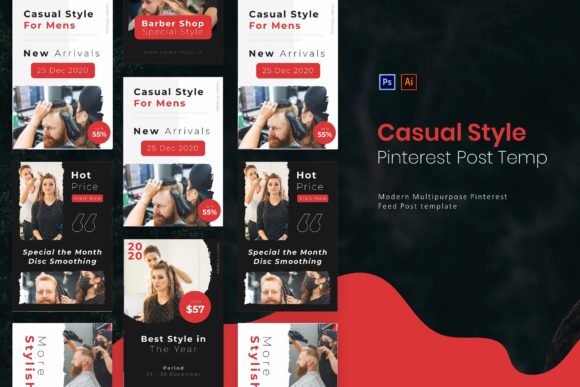
This template isn’t just another pretty file folder. It comes with five fully editable pages in both AI and PSD formats, sized at 735 by 1102 pixels (the standard for Pinterest vertical pins). The design is minimal and modern, with free fonts used so you don’t have to hunt down expensive typefaces. Every text layer, shape, and color is fully editable, and the files are well organized. A readme help file is also included, so even if you’re not a design pro, you can quickly figure out how to swap out your own images and copy. The whole package is built to help you create a consistent, elegant atmosphere across your Pinterest boards without spending hours on design.
Where and When This Template Shines
Pinterest is a visual discovery engine. People come there to find ideas, plan projects, and decide what to buy. If your pins look rushed or inconsistent, users may scroll right past. That’s exactly where this casual style template steps in. Because it’s minimal and clean, it works well across many niches—food, fashion, travel, home decor, education, digital products, and more. You don’t need a loud design to get noticed; you need one that communicates trust and clarity.
Many content creators juggle multiple platforms and don’t have the time to custom-design each pin from scratch. Having a reusable template like this one lets you focus on the message rather than the layout. You can create a batch of pins for a blog post, a product launch, or a seasonal campaign in minutes. The layered structure also means you can tweak the look to match your branding without starting over. It’s especially useful for new businesses or creators who want to look established without paying a designer for every single pin.
Real-World Ways to Use This Template
Let’s walk through a few scenarios to see how different people might actually use this Casual Style Pinterest Post Template in their everyday workflows.
A small business owner selling handmade candles. You want to promote new scents for autumn. With five editable pages, you can create a series of pins: one that shows the candle on a cozy table, another with a close-up of the label, a third with a quote about autumn evenings, and a fourth linking to your shop. Each pin shares the same layout and colors, so your brand looks cohesive. The minimal design lets your product photos stand out rather than compete with decorative elements.
A food blogger sharing seasonal recipes. You’ve just made a pumpkin soup and a spiced apple cake. Instead of designing separate pin images from scratch, you drop each photo into the template, adjust the text overlay, and you’re done. The casual style keeps the focus on the food itself, which is exactly what Pinterest users want when searching for dinner ideas. You can also vary the headline position within the same template, thanks to the editable layers, so your pins don’t look identical even though they’re from the same set.
An online educator promoting a course or ebook. Maybe you run a small business coaching service. Your Pinterest strategy involves sharing tips that lead back to your landing page. Using this template, you can create pin images that feature a short, actionable tip on a clean background. The elegant, minimal aesthetic signals professionalism, which builds trust with potential students. You can use different color variations (easily changed in Photoshop or Illustrator) to differentiate series, like “Strategy Mondays” or “Book Club Fridays.”
A freelancer building a personal brand. As a freelance graphic designer or copywriter, your portfolio pins need to reflect your taste. This template gives you a foundation that already looks modern, so you can swap in your own portfolio screenshots or headshots. The free font included pairs well with most styles, but you can also replace it with your own brand font. Over time, your Pinterest profile will look curated, making you more memorable to potential clients who follow you for design inspiration.
A hobbyist sharing DIY projects on the side. Maybe you knit, refinish furniture, or make digital art. You don’t need a full marketing strategy, but you’d like to share your work in a way that feels professional. The Casual Style Pinterest Post Template keeps your pins looking neat without requiring you to learn complex design skills. You can pin your projects as you complete them, and each one will feel connected to your personal brand simply by using the same layout.
What to Keep in Mind
Before you download and start editing, there are a few practical points worth considering to make sure this template works smoothly for your situation.
The template comes in both AI (Adobe Illustrator) and PSD (Adobe Photoshop) formats. If you already work in one of these programs, you’re set. If you don’t own Adobe software, you’ll need a way to open and edit PSD files—options like Photopea (free online) or Affinity Photo can work, but the layers might not behave exactly the same. The readme help file included is your best friend: read it first to see which fonts you’ll need and how the layers are structured. Skipping the readme can cost you time.
The dimensions (735 x 1102 pixels) are standard for Pinterest, but if you plan to share these images on Instagram or Facebook, you may need to resize them separately. Consider whether you’ll use the template across multiple platforms; sometimes a square crop works better for Instagram. The template’s design is minimal enough that you could copy elements into a square canvas, but you might need to adjust spacing.
Another thing: the included free font is carefully chosen to match the modern, minimal look. When you edit, try to keep the font consistent or swap it for another free font that has a similar feel, like Montserrat or Raleway. Changing to a very decorative or bold font could break the elegant mood the template is designed for. The colors in the template are fully editable, so you can tweak them to match your brand palette. Just remember that minimal designs work best with three or fewer colors—overdoing it can clutter the visual message.
Lastly, think about your Pinterest strategy before you create a flood of pins. The template is a tool, not a magic fix. Consistency in posting and using keyword-rich descriptions matter just as much as the visual. This Casual Style Pinterest Post Template helps you look polished, but your content needs to deliver real value to your audience. Use it to test different headlines, images, and calls to action. Because the template is easy to edit, you can experiment without a heavy time investment.
In the end, tools like this are about freeing up mental energy so you can focus on what you actually want to share. The minimalist design isn’t just a trend—it’s a way to let your content speak for itself. Whether you’re launching a side project, growing a small business, or simply building a beautiful board for your personal inspiration, having a reliable template makes the process smoother. Take a few minutes to explore the layers, read the help file, and adapt it to your own voice. The pins you create will look like they belong to a brand with years of experience, even if you’re just starting out.